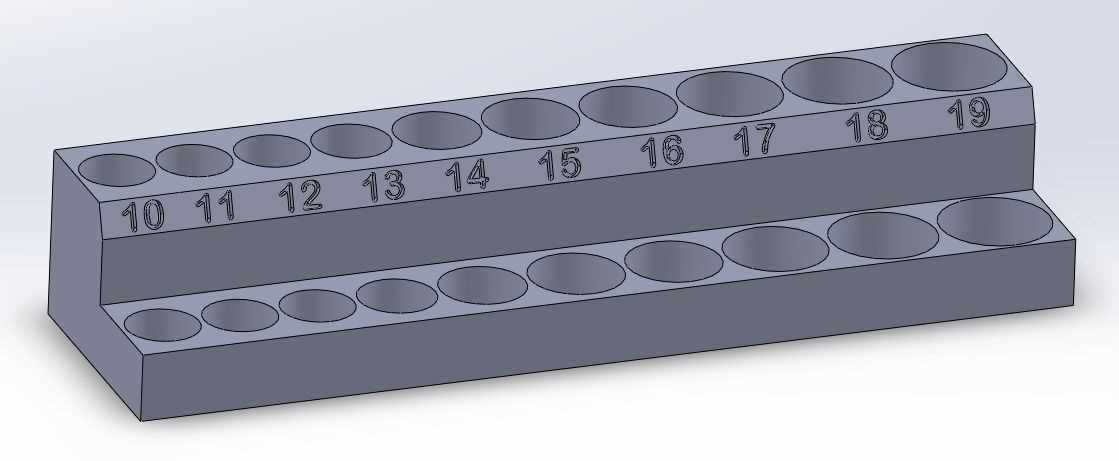
To keep your tools organized, start by creating a custom holder for your hand tools. Using a 3D printer, design a structure that fits various sizes of your tools and holds them securely in place. Customize the slots according to the number of pieces you own, ensuring everything has its designated spot.
Choose the right material for your design. Opt for a sturdy filament such as PLA or ABS that can withstand daily use without cracking or breaking. These materials are durable and provide solid structural integrity, especially for tool storage solutions.
Once you’ve designed the layout and chosen the material, use your 3D printer to bring your design to life. Monitor the printing process to make sure everything prints correctly, with clear and precise results. Afterward, carefully assemble your printed parts and organize your tools, keeping everything accessible and neatly arranged for future use.
3D Printable Socket Organizer
Start by selecting a design that fits your tool storage needs. Customize it for the number of pieces you have, ensuring that each tool has its designated space. Whether you need to hold just a few or a large set, the design should provide easy access while keeping everything neatly arranged.
For the material, use a durable filament like PLA, PETG, or ABS. These are robust and resistant to everyday wear and tear, ensuring that your storage system holds up over time. PLA is the easiest to print, while ABS and PETG offer higher durability, especially for heavy-duty use.
Once your design and material are set, print the sections separately to maintain quality and precision. After printing, you can assemble the parts together, ensuring each component fits perfectly. If necessary, use small screws or glue to secure the pieces for a more stable structure.
With your custom tool holder complete, you’ll find that everything stays organized and within reach. The modular design allows for future adjustments as your collection grows, providing flexibility for ongoing tool management.
How to Design a Custom Socket Organizer for 3D Printing
Start by measuring your tool collection. Determine the number of items and their specific sizes. This will give you a clear idea of how many slots you need and what dimensions each compartment should have to ensure a snug fit.
Use a 3D design software like Tinkercad or Fusion 360 to create your model. Begin by drawing the basic shape, then add individual sections that will hold each item securely. Ensure that the layout is both functional and easy to use, with spaces that are neither too tight nor too loose.
Consider modularity in your design. Create separate components that can be printed individually and then assembled together. This allows you to expand or adjust the storage as needed, without having to redesign everything if you add more tools later.
Choose the right material for printing. PLA works well for lightweight items, while ABS or PETG may be better for heavier tools. Be mindful of the material’s strength and durability, especially if your storage unit will carry a significant load.
When designing, also plan for ease of access. Ensure that the tools are easy to insert and remove. If necessary, include slight slopes or angles in your design to make tool retrieval smoother.
Pay attention to the print settings. High resolution ensures that the details in your design, such as the grooves or slots for each tool, are crisp and accurate. Also, use supports if the design requires overhangs that need to be printed with additional support structures.
Once the design is complete, double-check the measurements and fit before printing. Test the design with a small sample print to ensure that the tool holder meets your expectations, then proceed to print the full-size version.