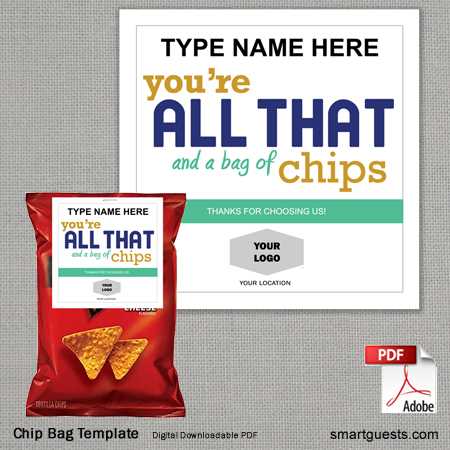
To create a personalized packaging for your snack products, begin by selecting a durable and flexible material, such as thick paper or lightweight cardboard. Ensure it has the proper coating for your printer to achieve high-quality prints.
For a polished look, use design software or online tools to craft a custom layout. Consider the shape and dimensions of your product and ensure that your design fits seamlessly on the chosen material. Use clean lines and readable fonts for a professional appearance.
If you’re new to packaging design, start with a template. These pre-made layouts can guide you in placing the product name, logo, ingredients, and other required information in the right spots. This helps maintain consistency and prevents errors in the printing process.
When it comes to printing, use a high-resolution printer to avoid blurry text or images. Adjust your printer settings to match the thickness of the material you’re using, and consider printing a test page before printing the final version.
Once printed, carefully cut the design to size and assemble the package. Pay attention to folding lines and edges to ensure a clean and secure seal. You can use adhesives or staples to keep the package intact, depending on your preferred design.
For a professional finish, consider adding a protective coating or laminating your packaging. This can enhance durability and give your packaging a sleek, glossy look that stands out on the shelf.
Printable Chips Bag Guide
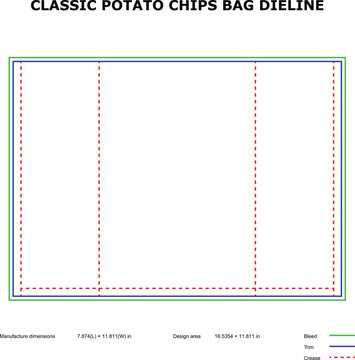
Selecting the right paper is the first step. For a sturdy package, opt for glossy or matte cardstock. It holds color well and provides a professional finish. Choose a weight between 200-300 gsm for balance between durability and print quality.
Design your package by paying attention to the dimensions. A basic layout will include the front, back, and sides, with fold lines clearly indicated. Make sure to align your product information, logo, and any regulatory details correctly.
Online templates can simplify the process. Websites offer free downloadable files for common packaging shapes. You can adjust these templates to fit your brand and even modify fonts, colors, and placements to match your style.
Use software like Adobe Illustrator or Canva for creating detailed designs. These tools allow for precise control over elements like spacing, alignment, and layering. Additionally, they offer advanced color options, ensuring your design pops when printed.
Printing is an important step. Use an inkjet or laser printer with high resolution (at least 1200 dpi). Adjust your print settings for optimal color accuracy and ensure the material is compatible with your printer’s capabilities. Run a test print before proceeding with the full batch.
After printing, it’s time to cut out the shape. A sharp pair of scissors or a craft knife will provide clean edges. If your design has intricate folds, a scoring tool can help create crisp lines that fold easily without tearing.
| Material | Recommended Weight | Finish |
|---|---|---|
| Cardstock | 200-300 gsm | Glossy or Matte |
| Plastic Laminate | 100-150 microns | Glossy |
| Kraft Paper | 120-200 gsm | Uncoated |
Finally, assemble the packaging by folding the sides inward and securing with adhesive or a stapler. A strong bond will ensure the contents stay safe and fresh. If you want to elevate your design, consider adding a branded sticker or label to the closure for a custom touch.
Choosing the Right Paper for Printing a Chips Bag
For a high-quality result, choose a durable paper stock like glossy or matte cardstock. This type of material holds colors well and offers a professional finish while maintaining strength. For an eye-catching effect, opt for a gloss coating, which enhances vibrancy.
If you’re printing large quantities, consider using a lightweight but strong material, such as 200-250 gsm paper. This provides a balance between durability and flexibility, making it ideal for folding into a compact package without risking damage during handling.
For a more premium look, you can use a heavier weight, like 300 gsm, which adds sturdiness and a luxury feel. Heavier paper is more resistant to tearing, which is useful if the packaging needs to withstand shipping or rough handling.
When it comes to texture, an uncoated finish can create a natural look that works well for rustic or organic-themed designs. It is also easier to write on, which can be useful for small batch or handmade products.
For waterproofing or moisture resistance, consider using laminated paper or a plastic coating. This ensures the packaging remains intact and your product stays protected from environmental factors like humidity.
Make sure the paper you select is compatible with your printer. Most home printers work well with standard matte or glossy sheets, but for specialty finishes like laminated or textured materials, ensure your printer can handle the specific weight and coating type.
Lastly, if you want to go eco-friendly, recycled paper is an excellent option. It may have a slightly rougher texture but provides a sustainable choice without sacrificing print quality, making it a good option for brands with environmental concerns.
Designing a Custom Layout for Your Chips Bag
Start by determining the dimensions of your package. Measure the height, width, and depth of your product, then create a layout that fits within these measurements. This ensures that your design will be properly aligned and scaled for the actual package size.
Focus on the arrangement of your key elements. The product name, logo, and primary image should be clearly visible on the front panel. The back should include any required information such as ingredients, nutritional facts, and branding elements in a clean, readable format.
Use contrast effectively to make important details stand out. Choose background colors that complement your logo and product, but avoid overwhelming the design. Consider the visual hierarchy–place key information at eye level and keep the text legible with appropriate fonts and sizes.
How to Use Templates for Printable Chips Bags
Start by selecting a template that matches the dimensions of your product. Many design platforms offer free downloadable files tailored to common packaging shapes, which saves time in layout design.
Customize the template by adding your brand’s logo, colors, and images. Most templates are editable in software like Adobe Illustrator or Canva, allowing you to adjust text, images, and placement to fit your style.
Ensure the template includes fold lines and cuts for easy assembly. This helps in creating a package that not only looks good but also assembles correctly without confusion or mistakes during the process.
Printing Your Chips Bag at Home or Professionally
If you plan to print your packaging at home, use a high-resolution inkjet or laser printer. Choose premium paper, such as glossy or matte cardstock, and adjust the printer settings to match the material’s thickness. Perform a test print first to ensure color accuracy and alignment. For best results, use the highest print quality setting and make sure the paper is securely loaded to avoid paper jams.
For large batches or more intricate designs, consider using a professional printing service. Professional printers offer high-quality color reproduction and can handle thicker or specialty materials like plastic or laminated sheets. This option is ideal for bulk production, providing faster results and a polished finish. Be sure to review the printing specifications with your provider to ensure the final product matches your design expectations.